Less busywork. More room to grow.

Dental insurance verification and operations, in one workspace.

Bring insurance verification, claims follow-up, provider management and daily tasks together for your practice or DSO. Book a full workflow demo, then explore a guided 14-day full-access trial. No credit card required.

After your demo, our team creates your account and sends your trial invitation. Training is included during the trial.

Your people. Your practice. One clearer view.

From a provider’s first day to the next revenue follow-up.

THE BIGGER PICTURE

Bring your working world together.

For DSOs & practice leaders

Trust starts with being heard.

Give your providers a voice—and a team that follows through. Xpand connects check-ins, feedback and assigned follow-ups to help your DSO build stronger provider relationships.

Listen beyond onboardingInvite feedback through scheduled check-ins.
Give every concern an ownerAssign a teammate and a clear next step.
Build trust through actionKeep follow-ups visible to your team.
Stronger relationships start with follow-through.
One workspace. More room to grow.

Live integrations: Open Dental, Eaglesoft, Dentrix Core, Dentrix Enterprise, Dolphin and Dentrix Ascend. Additional PMS connections are in development. Payer availability varies by plan and enrollment. Explore the directory ↗

Find your fit. Start with your practice systems and payers.

YOUR NEXT CHAPTER STARTS BELOW
Open Dental Dentrix Dentrix Ascend Dentrix Enterprise Eaglesoft Curve Hero
Xpand
Delta Dental Aetna Cigna UHC Dental DentaQuest Humana Ameritas Texas CHIP
Live integrations include Open Dental, Eaglesoft, Dentrix Core, Dentrix Enterprise, Dolphin and Dentrix Ascend. Other PMS connections are in development. Supported workflows vary by system, payer, plan and enrollment. See how Xpand fits your workflow ↗ · Connection details ↗

Third-party names identify products and programmes only; marks belong to their owners. Appearance does not mean affiliation, endorsement or an active integration.

Your practice. Your connections.

Find your PMS & insurance payer.

Less time chasing answers. More time moving your practice forward.

✓ Search by name or payer ID✓ See services at a glance✓ Plan your next step
01 / YOUR STARTING POINT

Select a system to check its connection status and the next step for your practice.

Loading payer directory…

Open the full payer directory & PMS lookup page →

Coverage & connection details

Payer listings show clearinghouse network capabilities. Your exact plan, transaction, provider enrollment and enabled Xpand connection determine availability. A listed payer does not mean every service is active for your practice. Additional clearinghouses will appear here when their directories are connected.

Your payer mix. A clearer way forward.

Bring your PMS and recurring checks. We will help map the right workflow for your team.

Show me what fits my practice →

Less switching. More doing.

Your team has enough work.
It does not need more tabs.

Messages here, meetings there, payer follow-ups somewhere else. Bring the work and its next step into one clearer view.

FROM SCATTERED TABS TO CONNECTED WORK

  • Google
  • Google Workspace
  • Google Meet
  • Zoom
  • Microsoft Teams
  • Gmail
  • Slack
  • WhatsApp
  • Vonage
  • Twilio
  • 1000+ Payer portals
  • Phone systems

Clear ownership. Shared context. Visible next steps.

YOUR TEAM’S WORK, TOGETHERFewer places to look.
More room to get things done.

Conversations, tasks and follow-ups, connected to the people responsible.

Illustrative workflow animation
ONE CONNECTED WORKSPACEYou need one place for the work. Xpand.*

Coordinate tasks, meetings, provider journeys and revenue follow-ups around the people doing them.

Less chasing. More progress.

Give your team time back. Keep your practice moving.

Turn scattered updates into clear next steps. Hire with confidence, keep revenue work moving and give every follow-up an owner—all in one connected workspace.

MAKE ROOM FOR WHAT MATTERS

  • More time for patients.Bring updates together so your team spends less time chasing them.
  • A clearer path to revenue.Keep payer responses and outstanding follow-ups in sight.
  • Support your providers can feel.Connect their feedback to a person who can take the next step.

A personal walkthrough, focused on your practice.

dental practice manager working at a laptop in a bright office
XpandYour practice, connectedWorkspace preview
ONE PLACE TO MOVE WORK FORWARDLess friction. More follow-through.
Provider hiringWORKFLOW PREVIEW
From first conversation to a confident start.

Keep the candidate, next action and responsible teammate together at every step.

  1. Application
  2. Interview
  3. Offer
  4. Agreement
Next: review the interview and assign the offer follow-up.

Illustrative workflows and charts.

↗
RecruitmentInterview ready for review
✓
Practice accessAssigned team view

Dental practice management software

Less time on admin. More time for patients.

From dental insurance verification to claims tracking and AR follow-ups, Xpand helps your team keep revenue work organized. Bring tasks, owners and next steps together, so less of your day is spent chasing updates.

See how Xpand simplifies your day
Explore benefits and AR workflows

Xpand in 90 seconds

See where your team could get time back.

Watch how Xpand connects provider support, revenue work and everyday tasks. In 90 seconds, see how shared information and clear next steps can help your team spend less time coordinating and more time getting work done.

Prefer to read? Open the tour transcript

[Cinematic music begins]

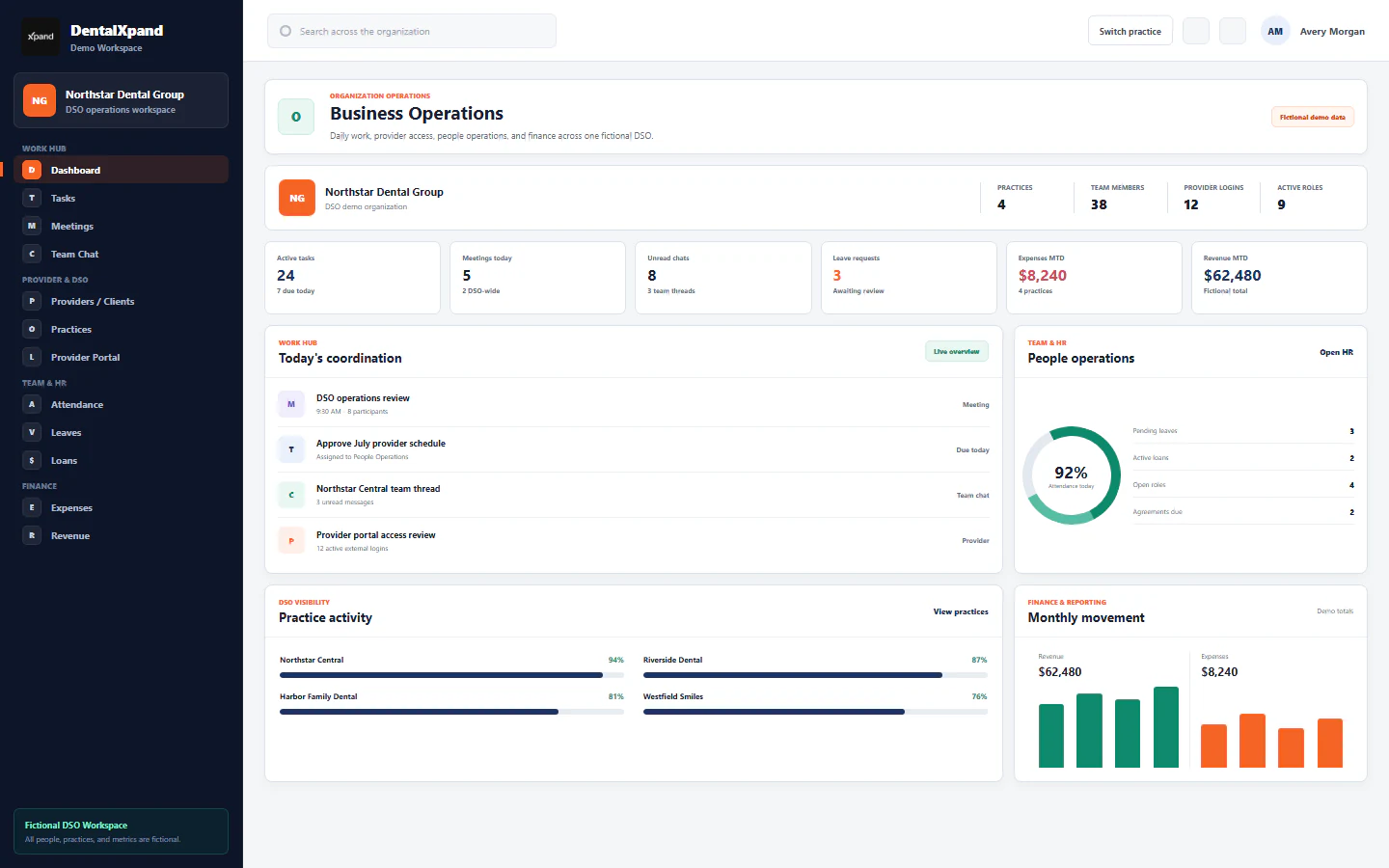
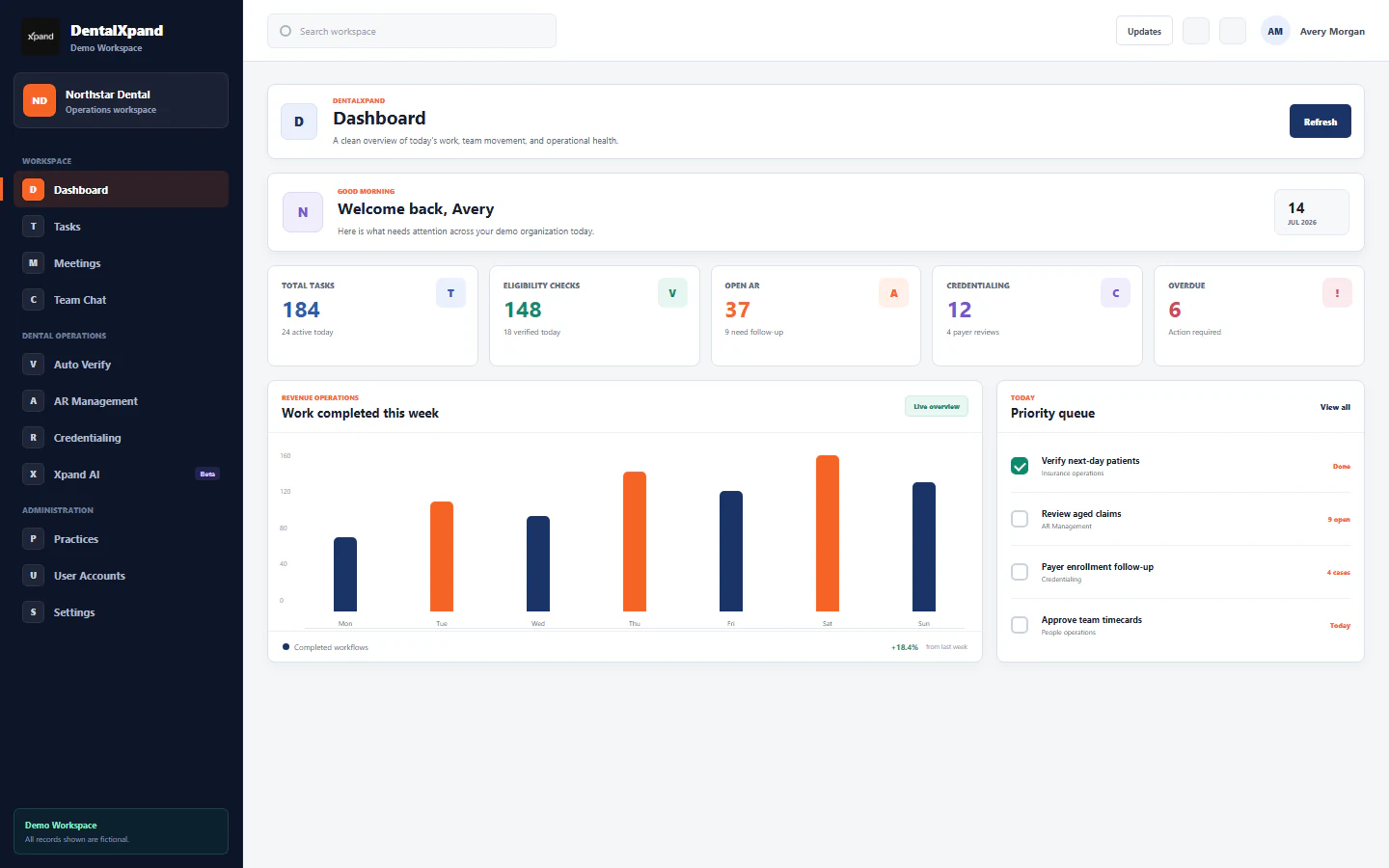
DentalXpand brings daily work, people, and decisions into one connected dental operations platform.

Nine operating areas share organization, practice, role, and workflow context, so every team sees the right work.

Work Hub connects dashboards, tasks, meetings, chat, notifications, documents, and support without losing context.

Practices, providers, DSOs, and billing companies get focused access with the right visibility across locations.

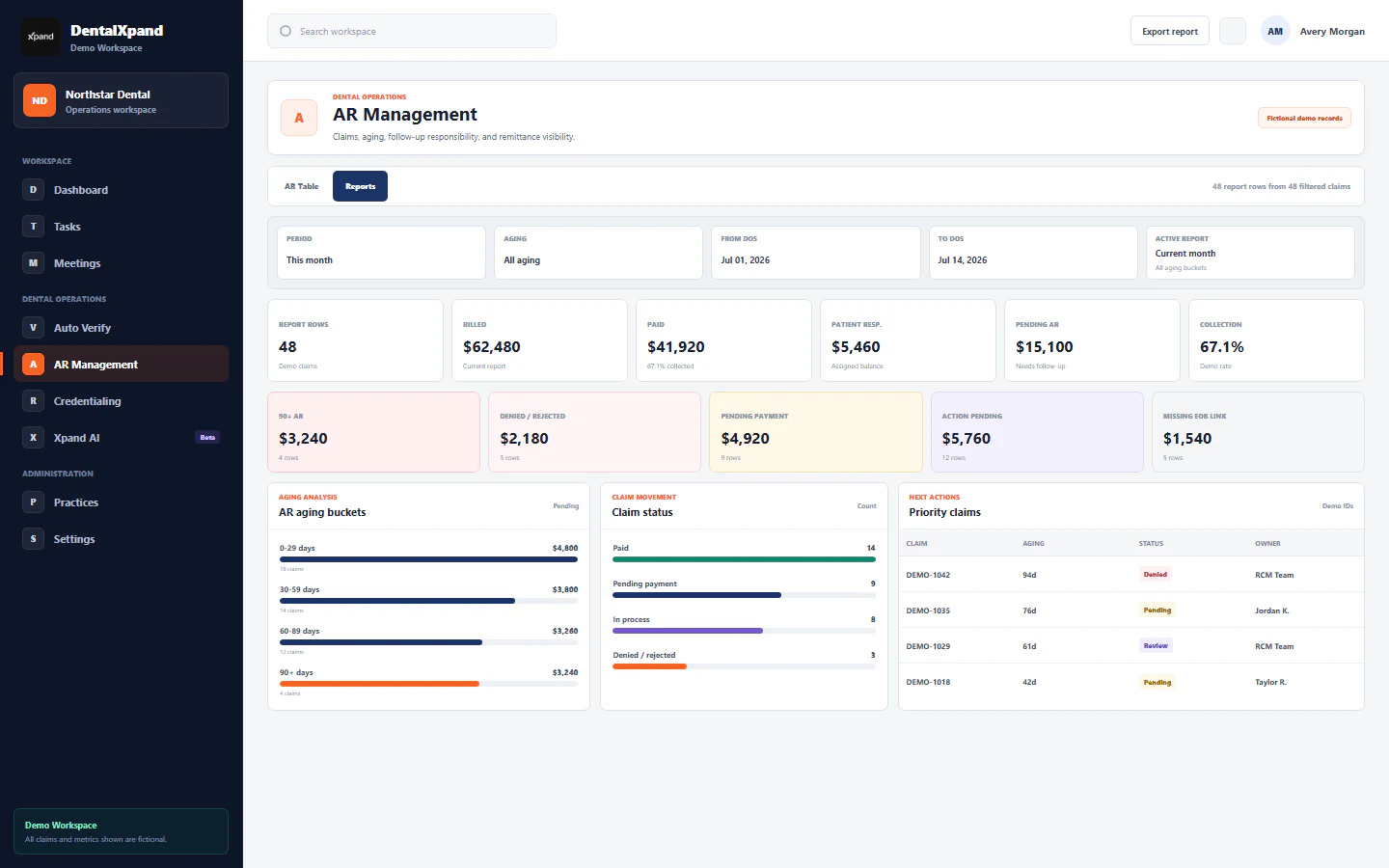
Revenue teams move from benefits and automated verification to claims, aging, follow-up, and AR, with clear ownership.

Credentialing keeps provider records, payer enrollment, documents, follow-ups, and client progress together from intake to effective date.

People operations connect attendance, time, leave, loans, recruitment, agreements, notices, and the team behind the work.

Finance and growth link expenses, revenue, reporting, lead research, outreach, calls, and each next action.

Admins control users, roles, practice scope, and access. Xpand AI respects every permission boundary.

DentalXpand gives modern dental organizations one operating picture for the work behind every patient visit.

[Music fades]

LESS OVERHEAD. MORE ROOM TO GROW.

10 ways Xpand helps your dental group save money.

Software subscriptions add up. So do payer calls, repeated admin and unexpected staffing gaps. Put your dental practice software to work on the costs your team feels every day.

More time for patients. More room in your budget.Read the detailed savings guide
01

Extra workspace seats

Keep everyday communication in Xpand.

Send workflow emails and use built-in team chat. Reduce the need for extra workspace accounts purchased just to coordinate daily work.

Email + team chat
02

Separate calling tools

Bring practice calls into the workspace.

Connect Twilio or Vonage to make and receive calls in Xpand. Simplify your calling setup and reduce the need for a separate calling app for every teammate.

Twilio + Vonage
03

Unexpected provider departures

Hear concerns before a resignation.

Anonymous surveys, check-ins and visible follow-up help you understand why providers may leave. Act earlier to support retention and prepare for staffing gaps that can disrupt patient care.

Listen → act → retain
04

Hours of manual verification

Get benefit answers without the hold music.

Run bulk dental insurance verification and receive organized breakdowns of benefits. Xpand can process up to 1,000 patients in an hour, reducing time spent calling payers and completing forms.

Up to 1,000 patients / hour
05

Separate meeting subscriptions

Meet your team wherever they work.

Use Xpand’s built-in unlimited meetings and chats to connect with remote staff, overseas teams and clients. Consolidate tools your team uses only for conversations and meetings.

Unlimited meetings + chats
06

Routine claim-status calls

Move claim follow-up out of the phone queue.

Check up to 1,000 claims in an hour through supported connections. Bring responses into one worklist so your billing team can focus on exceptions and claims that need a person’s attention.

Up to 1,000 claims / hour
07

Portal-hopping admin

Find the next answer in one place.

Run supported eligibility and claim-status checks in Xpand. Cut repeated logins, copied payer responses and routine calls across insurance portals, while keeping follow-up ownership visible.

Fewer logins. Clearer next steps.
08

Entering the same details twice

Let completed benefit forms travel with the work.

Download standardized benefit forms and send them to your connected PMS. Supported record and table updates help reduce repeated typing and the time spent moving information between systems.

Benefit forms → connected PMS
09

Repetitive billing tasks

Put routine posting and secondary claims to work.

Automate supported payment posting and secondary claim submission. Give your billing team more time for exceptions, patient questions and revenue follow-up that needs their judgment.

Post → submit → review
10

Hiring and onboarding rework

Carry every hiring decision forward.

Keep applications, interviews, offers, agreements and onboarding connected. Reduce duplicate coordination and lost handoffs so your team can spend more time building the right provider relationships.

One connected hiring journey
Where is your team spending more than it needs to?

Let’s walk through your tools, your workflows and the opportunities for your dental group.

Find your savings opportunities

Savings vary with your current costs and enabled workflows. Verification and claim-check volumes depend on payer availability, enrollment, data quality and configured connections. Twilio/Vonage numbers and calling usage may carry separate charges. Xpand workflow email does not replace a hosted business mailbox.

Dental billing, provider hiring & retention

Clearer revenue. Stronger teams. Less chasing.

Start with the work that takes your team the most time: checking benefits, following up on claims or coordinating a provider’s next step. See how Xpand keeps the record, the responsible person and the next action together.

01 / BENEFITS & CLAIMS

Your list in. Clear answers out.

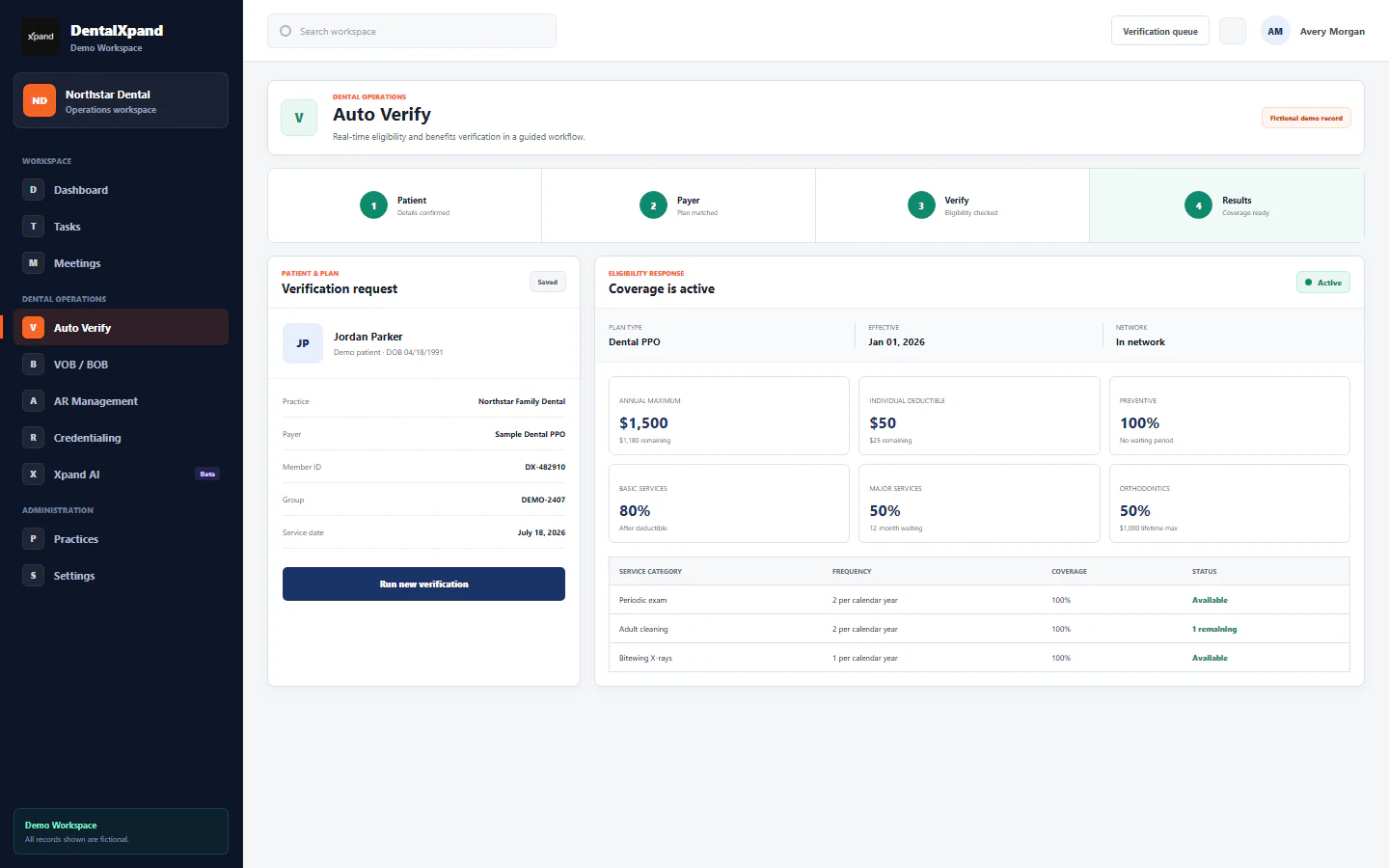
Run insurance verifications and claim-status checks from your uploaded lists. Bring returned coverage, deductibles and limits into a detailed breakdown of benefits, track claim responses, and download organized PDF reports.

Explore benefits & claims
Benefits & claims

From a patient list to organized answers.

Insurance benefits and claims status, together.
02 / PROVIDER HIRING

Give great candidates a reason to choose your team.

A strong first impression starts before day one. Keep applications, interviews, offers and agreements together, so your hiring team can follow through on conversations and guide each candidate toward a well-prepared start.

See how provider hiring works
03 / PROVIDER RETENTION

Keep listening after the welcome.

Joining is only the beginning. Scheduled check-ins give providers a way to share how work is going. Keep their feedback in view and assign follow-ups to the right leader, so concerns have a clear next step and relationships have room to grow.

See how provider check-ins work

Provider agreements & dental AR follow-up

Spend less time chasing signatures and claim updates.

Know where an agreement stands and which claims need attention. See how Xpand keeps signing progress, payer responses and available ERA/EOB documents organized, so your team can focus on the next action.*

01 / PROVIDER HIRING

From introduction to signed.

↗

The candidate, the agreement, the next step. Together.

Animated sample hiring workflow: application, interview, accepted offer, agreement sent and opened, provider signature, practice countersignature, then signed PDF and certificate received. The team is notified. Signing requires a connected service.

Every signature stays with the provider
02 / AR FOLLOW-UP

Your list. Answers in motion.

↗

Track responses. Retrieve available ERA/EOB documents.

Animated sample batch of 48 claims: 40 matched ERA/EOB documents, 28 paid in full, 8 partially paid, 6 denied and 6 pending. Payer-reported paid amount is $19,360 and returned patient responsibility is $640. This website does not upload records or download files.

Payer-reported amounts, in one view

Connected dental practice management

Keep your people, revenue and daily work moving.

Less time chasing updates. A clearer next step for everyone. From provider hiring and dental RCM to team tasks and financial reporting, Xpand brings the work together. Explore the previews below to see how each workspace can help your practice.

Connected dental practice operations

Help every team own their work. Keep leadership in the loop.

From daily tasks and provider support to HR and finance, give each team a clear place to manage its responsibilities. Xpand connects the work across your dental practice or DSO, helping leaders see what needs attention without chasing every department for updates.

Multi-practice management for dental groups & DSOs

Grow your group. Keep every team focused.

More locations should not mean more confusion. Give each person access to the practices and pages their role needs, while leaders keep a connected view across the organization. Xpand helps local teams focus on their work and leadership stay close to what needs attention.

See how access fits your team
Xpand ONE GROUP. CONNECTED TEAMS.Your practices, together PREVIEW
Downtown practiceIn this view
Northside practiceIn this view
Leadership

Stay close to every practice

Both practices See where your group needs attention and keep provider follow-ups moving across locations.
  • Practice overview
  • Provider operations
  • Survey follow-ups
One organization. Access shaped around each role.

Insurance connections · Clearinghouse network

More payer answers.
Fewer places to look.

Connection setup required

One login. One workspace. Centrally managed team access. Give your team one place to run supported eligibility and claim-status checks across a clearinghouse network listing 1,000+ dental-tagged payer records—without handing each user separate payer-portal credentials for those checks. Assign practice access and permissions in Xpand, and revoke Xpand access from the same place.

NETWORK REACH1,075

Dental-tagged payer records

270 / 271853

Records listing eligibility

276 / 277505

Records listing claim status

Search insurance by name or payer ID → · Coverage and connection requirements

Your questions, answered

Dental practice software, explained.

Choosing software starts with knowing how it fits your team. Find clear answers about insurance verification, dental RCM, provider hiring and managing multiple practices.

LET’S MAKE IT SPECIFIC

Have a question about your setup?

Tell us which practice system you use and the work you want to simplify. We can walk through what fits and what needs a connection.

Talk through your practice’s needs
What does DentalXpand help a dental practice manage?

DentalXpand is dental practice management software for the operational work around patient care: provider recruitment and retention, credentialing, insurance verification, claims follow-up, team tasks and reporting. It brings information, responsibilities and next steps together so your team spends less time chasing updates. Clinical charting and scheduling stay in your existing practice management system.

Does Xpand replace our dental practice management system (PMS)?

Keep your PMS. Give your billing team up to 80% less manual work. Xpand works alongside your existing dental practice management system, so your team can continue using it for clinical charting and scheduling. Let Xpand handle repetitive insurance verification, benefit forms, claim-status checks, payment posting and secondary claim submission, while your people focus on exceptions, patient support and revenue follow-up. Supported PMS connections keep records updated across the workflow. The reduction in manual work depends on your starting processes, payer support and enabled automations.

How can a DSO manage multiple dental practices in Xpand?

A dental service organization can organize work by practice and assign access to match each person’s responsibilities. Local teams can focus on their assigned locations while authorized leaders review work across the group. This supports multi-practice management without giving every teammate the same view.

How does dental insurance verification work in Xpand?

Five ways to put dental benefit answers at your fingertips. Start with the information you already have, and let Xpand help your team turn it into a clear, standard breakdown of benefits.

  1. Upload an existing verificationAdd a scanned document, raw text, CSV or PDF and turn the supplied verification information into a standard breakdown-of-benefits form in seconds.
  2. Verify your whole patient listUpload a patient CSV and click Verify All to run hundreds of insurance verifications in one batch.
  3. Check one patientEnter the patient details and click Verify to retrieve the available eligibility and benefit information.
  4. Get ready for tomorrowClick Verify Tomorrow’s Patients to check the next day’s patient list from your connected PMS.
  5. Ask Xpand AIUse AI chat to request the verification and let Xpand handle the supported workflow for you.

Download your completed benefit forms or send them to your connected PMS. Document uploads organize the information supplied; live checks retrieve available payer responses. Results depend on the input, payer support and configured connections.

What does Xpand do for dental RCM and AR follow-up?

Less chasing, clearer claim follow-up. Xpand brings the same flexible approach to dental claims and accounts receivable (AR), so your team can start with a document, a list, an individual claim or a conversation with AI.

  1. Upload a claim responseTurn scanned documents, raw text, CSVs or PDFs into organized claim information your team can review.
  2. Follow up in bulkUpload a claims CSV and run claim-status checks across the list.
  3. Check an individual claimEnter the required patient and claim details to retrieve an available status update.
  4. Work through your follow-up listUse your connected practice worklist to review claims that need attention and keep the next action clear.
  5. Ask Xpand AIRequest a claim-status check or supported follow-up task through AI chat.

Xpand also supports downloadable reports, updates to connected PMS records and tables, automatic payment posting and secondary claim submission. Keep owners and next steps visible while your team focuses on exceptions. Available actions depend on payer support, enrollment and configured connections.

How does Xpand support dental provider recruitment and retention?

Help providers feel heard—and give them more reasons to stay. Xpand connects recruitment, interviews, offers and onboarding, then supports provider retention through regular check-ins, surveys and feedback. Anonymous surveys give providers space to speak openly, helping leaders spot concerns earlier, understand what may drive someone to leave and address issues before they grow. Tracked feedback gives providers visibility into who is reviewing their concern and what action is being taken. With clear ownership and follow-up, your DSO can turn listening into practical support, build trust and better understand the reasons behind provider turnover.

How does role-based access work for dental teams?

Administrators can assign roles, pages and practice access around each person’s responsibilities. A practice manager and recruiter can have different views, while leadership can be assigned access across locations. Your team can focus on the work and practices it is authorized to manage.

What can we review in a DentalXpand software demo?

Bring a workflow your team wants to improve, such as provider hiring, dental insurance verification or AR follow-up. We will review your practices, roles and priorities, walk through the relevant features and discuss the connections your setup would need.

Can we check whether our insurance payers are supported?

Dental insurance answers, right at your fingertips. Xpand supports 1,300+ payers, including 1,000+ dental payers across commercial insurance and state programs such as Denti-Cal. Bring eligibility, benefit details and claim-status updates into one workspace—helping your team spend less time switching portals and chasing answers, and more time supporting patients and moving follow-ups forward. Share your payer list with us, and we can confirm the services available for your payers and help with any required enrollment.

Will Xpand automatically sync with our practice software?

Live integrations are available for Open Dental, Eaglesoft, Dentrix Core, Dentrix Enterprise, Dolphin and Dentrix Ascend. Additional PMS connections are in development. Automatic synchronization depends on your system, version and configured workflow; confirm the records, update permissions and refresh intervals during your demo. You can begin with uploaded patient data once our team creates your account, without waiting for PMS onboarding.

DentalXpand

YOUR TEAM. YOUR WORKSPACE.

Less scattered work. More room to grow.

Built around the way dental teams work.

DentalXpand

LET’S TALK ABOUT YOUR TEAM

Make room for better work.

Have a question or want a walkthrough? Tell us what your practice or DSO needs.

Required fields are marked with an asterisk.

This site is protected by reCAPTCHA and the Google Privacy Policy and Terms of Service apply.
Privacy policy